


Apple iOS 16
Source: Apple
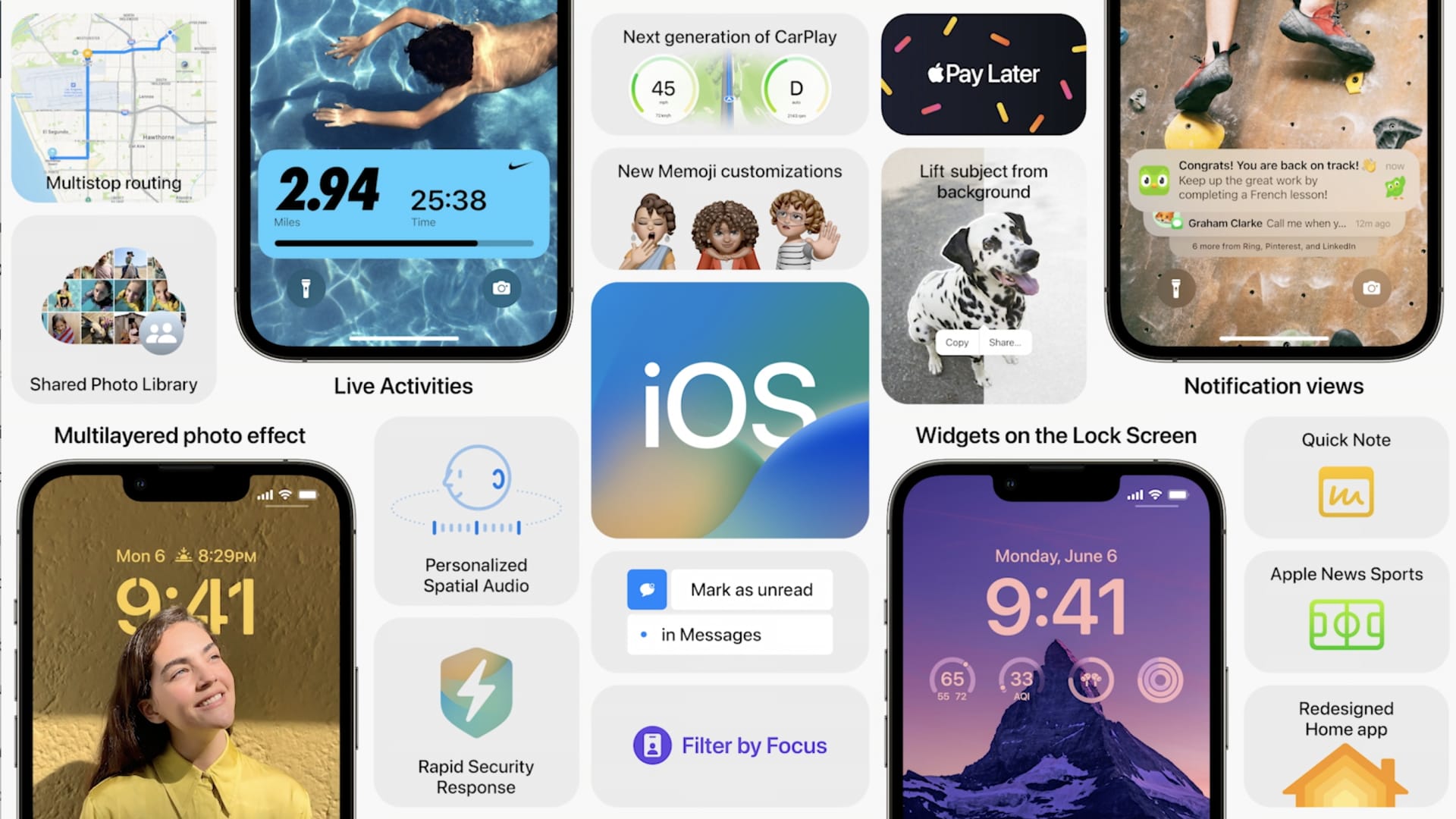
Apple released the first public beta version for iOS 16 on Monday. That means anyone with an iPhone 8 or newer can try an early version of the next big update for the iPhone, which is expected sometime this fall alongside new iPhone models.
IOS 16 will let users customize iPhone’s lock screen, unsend and edit iMessages, schedule emails and more.
Like all pre-release software, it will have bugs, so users should be cautious about installing it on a device that’s used for work or daily use. It’s best for technology enthusiasts who want to see what’s coming before the general public and are willing to help Apple identify problems.
“Please note that since the public beta software has not yet been commercially released by Apple, it may contain errors or inaccuracies and may not function as well as commercially released software. Be sure to back up your iPhone or iPad and your Mac using Time Machine before installing beta software,” Apple warns on its website.
Apple unveiled iOS 16 in June at its annual Worldwide Developer Conference. Users with an Apple developer account were able to install iOS 16 shortly after the conference.
The public beta version released on Monday no longer requires a developer account and is intended to get the public’s help squashing bugs before an official release.
The software will be available for everyone with an iPhone released in 2017 or later. The oldest device supported is the iPhone 8.
This year, iOS 16 has several major improvements, especially for its messaging experience in iMessage and Mail.
Some of the big changes include:
- Customizable lock screens. Users will be able to add smaller widgets with real-time data such as the weather forecast on the lock screen, and even change the font of the clock for the first time.
- Unsend and edit iMessages. Users will have 15 minutes after sending a message to either edit or unsend it in iMessage. The other user won’t get a notification but will see that the message has been edited or recalled.
- Better group texting with Android users. Android users’ reaction to an iMessage — such as small thumbs-up — will no longer be displayed as an announcement. Those reactions will get attached to SMS messages the same way as an iMessage.
- Schedule emails for the future. The built-in Mail app on iPhones now has a more functional search feature as well as the ability to schedule sending an email for a time in the future, like tomorrow morning at 9 a.m.
- Artificial Intelligence automatically sorts, edits, translates and shares photos. IOS 16 uses AI to automatically share photos with up to six people based on who’s in the photo — such as kids or family members. The AI can translate text in photos or videos that the user takes, as well as cut out a subject, such as a person, from a photo and place it into images or other apps as a sticker.
- Short-term loans in Apple Wallet. Apple introduced a feature called Apple Pay Later, allowing users to make purchases with Apple Pay first and then pay off the balance through four payments over six weeks. Apple Wallet in iOS 16 will also make it easier to share digital cards or home keys through messaging.
- Apple Maps can add multiple stops to a route. Apple Maps will allow you to add different stops to a route. Next year, Apple will reveal an updated version of its car software, CarPlay, that will take advantage of this Maps update and more closely integrate with the car’s built-in hardware.
- More ways to control notifications. Apple will enable users to have entirely different wallpapers or app setups for different times of day, like when the user is at work or asleep.
- “Hey Siri, hang up.” Siri will soon help you hang up a FaceTime or phone call.
- Apple’s Home app gets a redesign. Apple also said that it’s supporting Matter, an open standard for smart home hardware such as locks, lights and blinds. It also redesigned the Home app to better show things such as multiple cameras in and around your house in an easy-to-view side-by-side mode.
- Medication and sleep tracking in the health app. Apple’s health app now allows users to input their medications and how often they’ve taken them. It can also notify users when it’s time to take medicine. Apple Watch owners will be able to monitor their sleep and heartbeat in the iPhone health app.
- Safety Check. A new feature called Safety Check enables users to quickly turn off all services and apps, such as location, being shared with the user’s family. Apple said the feature was designed in partnership with women’s groups and is particularly designed to make it easier to stay private or protect personal data and safety when leaving an abusive relationship.
- Use your iPhone as a webcam. With iOS 16 and the new version of macOS, users can now use their iPhone as a webcam in a feature called Continuity Camera with the right laptop mount.
How to install the iOS 16 public beta on your iPhone
Apple Shared Photos
Source: Apple
If you’re hungry to see and test these and other changes now, installing the public beta is easy, but not as easy as a typical iPhone software update.
- Visit Apple’s beta software site on your iPhone and sign up or sign in using your Apple account.
- Sign up by selecting “enroll your devices” and agree to Apple’s terms.
- Pick the software you want to try out — Apple also released a public beta version for iPads.
- Click the button that says “Download profile.” Your phone will warn you that it’s trying to download a configuration profile. Approve it.
- Go to Settings and click on the “Profile Downloaded” section at the top of the app to download and restart your phone.
- Go to Settings and check for an update. It will download the beta and install it.
